oosVersion 2.1
NAT
NAT
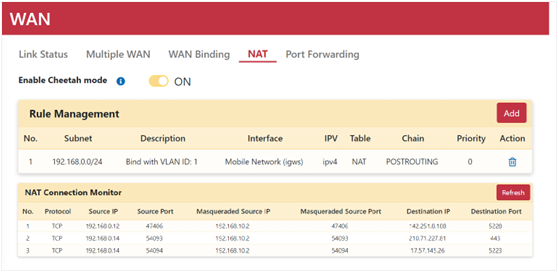
NAT (Network Address Translation) facilitates communication between public and private networks. When an interface port type is defined as WAN, system NAT rules are generated to establish subnet connectivity with the Internet.
If a NAT rule associated with a WAN interface is deleted, the corresponding WAN port type automatically reverts to LAN.
Configuring NAT Rules
- Navigate to Networking > WAN > NAT.
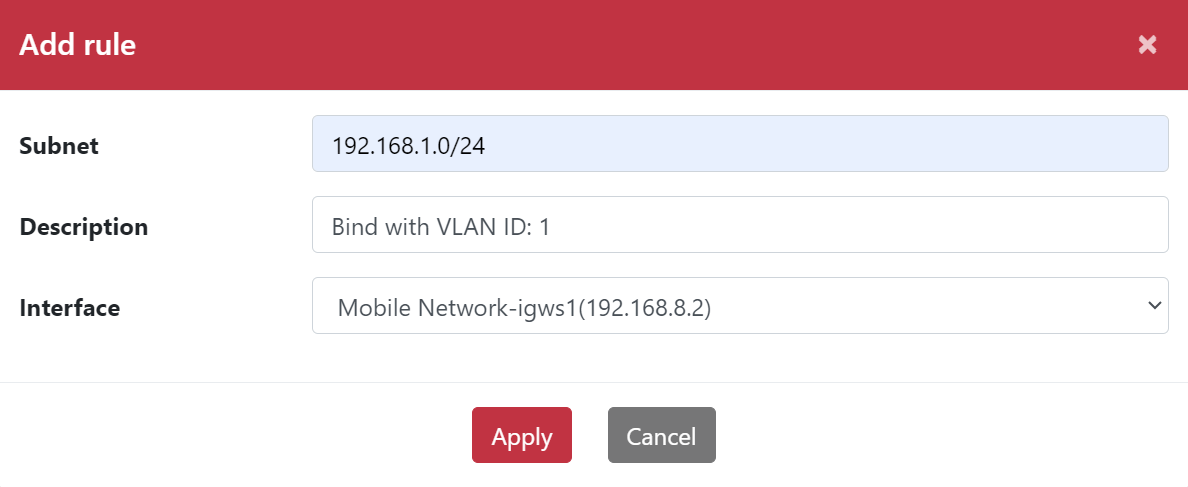
- Click the Add button.
- Enter the Source Subnet (e.g.,
192.168.0.0/24). - Enter a Description.
- Select the target Interface (e.g., Mobile Network).
- Click Apply.
Cheetah Mode
Cheetah mode is enabled by default to enhance upload and download throughput. If specific factors in your network environment cause unexpected throughput degradation, disable this option.